









 Home
Home
 Forum Index - Topic Index How to use of Astah (Pro/SysML/GSN/Com)
How to create Class lifeline in Sequence Diagram? Forum Index - Topic Index How to use of Astah (Pro/SysML/GSN/Com)
How to create Class lifeline in Sequence Diagram? |
| Threaded | Newest First | Previous Topic | Next Topic | Bottom |
| Poster | Thread |
|---|---|
| mariana | Posted on: 2008/9/10 1:58 |
Just popping in   Joined: 2008/9/10 From: Posts: 2 |
How to create Class lifeline in Sequence Diagram? How can one create Class lifeline, i.e. something like
----------- not like ----------- , | MyClass | | :MyClass | ----------- ----------- in Sequence Diagram? Thanks. |
| mariana | Posted on: 2008/9/10 2:02 |
Just popping in Joined: 2008/9/10 From: Posts: 2 |
Re: How to create Class lifeline in Sequence Diagram? Adding:
I could rename the object to take of the ":", but I want to know if there a specific way. Thanks again. |
| Joba | Posted on: 2008/9/10 14:55 |
Developer   Joined: 2006/6/6 From: Posts: 969 |
Re: How to create Class lifeline in Sequence Diagram? Dear Mariana,
Thank you for your inquiry regarding the Lifeline notation. Currently JUDE always displays the BaseClass name with : at the beginning in the lifeline according to the UML specification (Lifeline notation). To show it without :, follow these steps. 1. Create a lifeline and specify the BaseClass (Or create lifeline by doing drag&drop a class from the Structure Tree) The lifeline is displayed like this 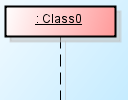 2. Turn off the [Class Name Visibility] from lifeline's Pop-Up menu. 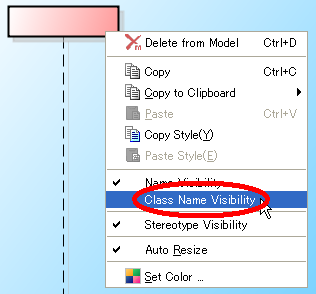 3. Then put the BassClass name in the Lifeline Name. So that the lifeline shows the class name without :, and it still has the Baseclass specified. 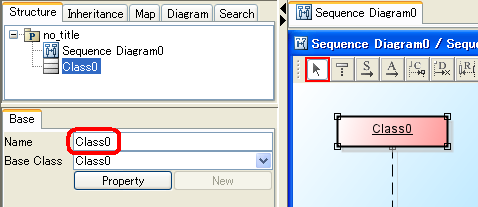 If this isn't what you asked for, please let me know. Thanks. -Satomi |
| Threaded | Newest First | Previous Topic | Next Topic | Top |
